Before you start
This page describes how the system is designed to work. The app and the programs inside the devices are not written yet, so details will change. Battery times are worked out from data sheets, not measured.
A working set is a collar and a phone radio. The car monitor and the home base are extras. The app is for iPhone.
| Piece | Where it lives | What you do with it |
|---|---|---|
| Collar | On the dog | Charge it. Everything else is done from the app. |
| Phone radio | On the back of your phone | Switch it on when you go out. Swing the antenna out for more reach. |
| Car monitor | On a headrest post | Press its button when you step away from the car. |
| Home base | On a counter, plugged in | Look at it. Three buttons change the page. |
1. Charge
- Collar. Pull the clear plug out of the side of the bumper. It stays attached by its leash. Plug in any USB-C charger. A light shines through the plug while the collar charges.
- A full charge takes about 13 hours for the collar and about 4 hours for the small collar. Overnight is the easy habit.
- Press the plug all the way back in before the collar goes on the dog. The plug is what keeps water out of the socket.
- Phone radio. USB-C on its lower edge. Charge it like the collar.
- Car monitor. Plug it into the car's USB socket. Fit three AA lithium cells for when the car is off.
- Home base. It stays plugged in to any phone charger.
Do not fit rechargeable cells in the car monitor, and do not charge the collar in a hot car or below freezing. Lithium batteries should only be charged between about 32 and 113 °F.
2. Pair the collar
- In the app, open Collar and choose to add a collar.
- Plug the collar into a charger and hold your phone next to it. The collar only accepts a new owner in the first two minutes after it is plugged in. That is on purpose: you have the collar in your hand, and a stranger does not.
- The app finds the collar over Bluetooth and makes two keys. One lets a phone give commands. The other lets a device read the collar's reports.
- Name the dog. Set the strap length if you have the light collar.
A second phone. On the first phone, show the sharing code under Collar. Scan it with the second phone. There are no accounts and no passwords.
If pairing does not start, unplug the collar, plug it in again, and try within two minutes.
3. Add the phone radio
- Slide the phone radio's switch on. Its light blinks.
- In the app, open Radios, choose to add a phone radio, and press the radio's button once.
- Snap the radio onto the back of the phone. The magnets set it straight.
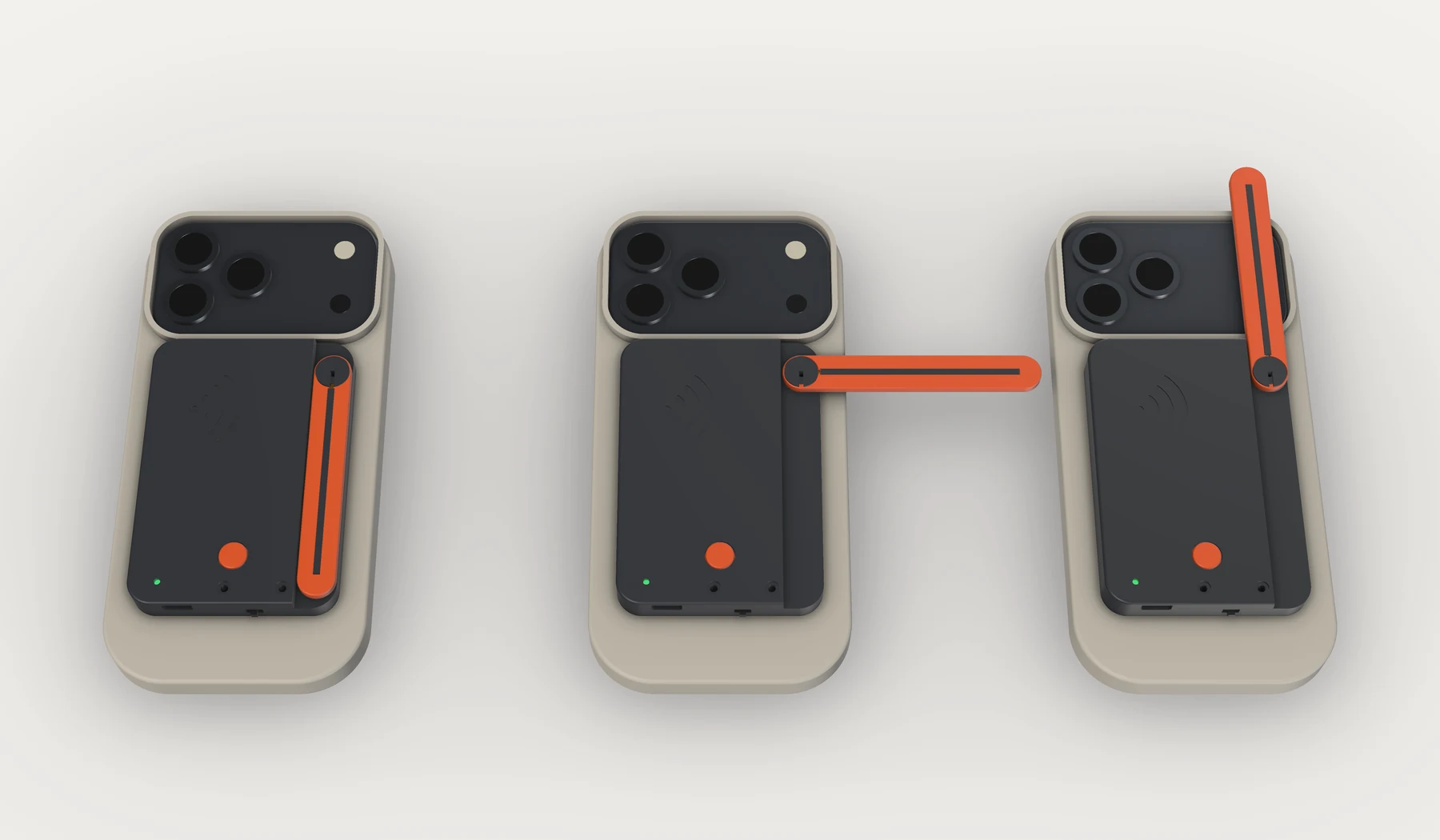
- Folded down, the radio still listens. Swing the antenna out to the side or straight up when you want more reach.
- Straight up, the antenna stands beside the camera flash. Fold it aside for flash photos.
- Slide the switch off when you are home for the day. On, it lasts about 4 days.
- The phone radio holds no keys. If you lose it, nobody learns anything about your dog.
4. Fit the collar
- Punch two holes in the strap and screw the box on from the inside of the strap. The build guide gives the hole spacing.
- Buckle the strap so you can slide two fingers under it, no more and no fewer (American Kennel Club). Check again when the coat changes and as a young dog grows.
- Seat the box on the back or side of the neck when you can, with its orange face outward. The GPS sees the sky best from there.
- Look at the skin under the neck pad now and then, as you would under any collar.
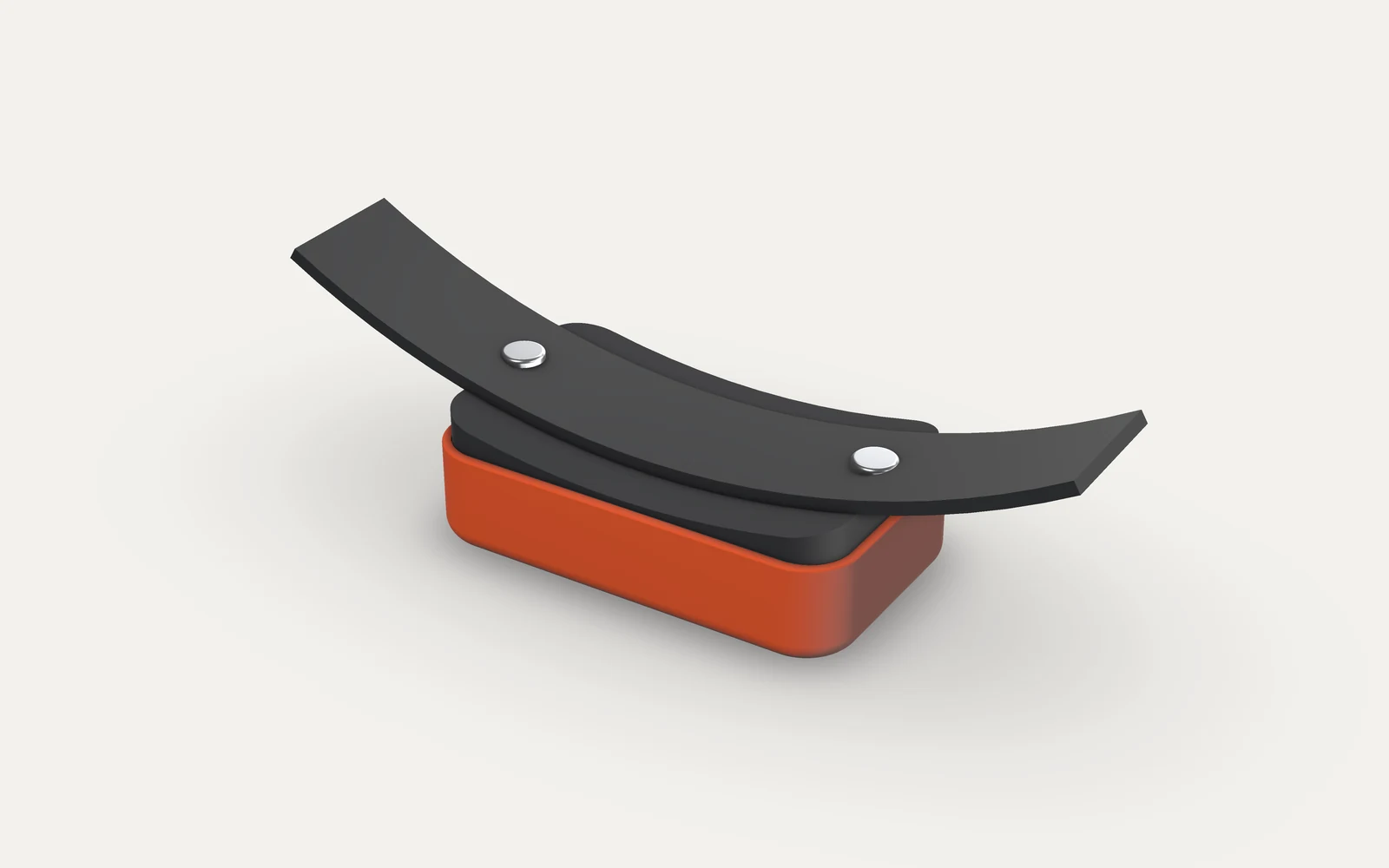
The box will slide round to hang under the chin on a loose strap. It still works there, but GPS and radio reach are weaker with the dog's neck in the way.
5. Every day
Map
The map shows where the dog is, how old that position is, and how strong the signal was. Find now asks the collar for a fresh position and switches it to tracking, a position every 2 seconds, until you stop it.
Controls
- Voice plays one of your recorded clips from the collar: "come", "leave it", "good dog". Record them in the app; the collar keeps them.
- Tone plays a beep. Vibrate buzzes the collar for the length you set.
- Stop everything cancels any sound or vibration at once.
The first tap takes about a second. The collar sleeps to save its battery and checks for you once a second. After it wakes, taps in the next 10 seconds are instant.
What the collar does by itself
| Mode | When | What it does |
|---|---|---|
| Home | It hears the home base, or your phone is close, and the dog is still | GPS off. A status report every 5 minutes. |
| Walk | The dog is moving and your radio is in range | A position every 30 seconds. |
| Track | You pressed Find now, or the collar left home with no radio of yours in range | GPS on all the time. A position every 2 seconds. |
| Low battery | The battery is nearly empty | A report every 10 minutes, so the last of the battery lasts. |
Activity
The Activity screen shows steps and the day split into resting, walking and running.
6. Barking
- The collar counts a bark only when its microphone and its motion sensor agree. A neighbor's dog is heard but not felt, so it does not count.
- On the Barking screen you choose what happens: nothing, a note in the app, a tone or a voice clip, then a vibration. You set the order and where it stops.
- The collar limits how many times it answers in a minute and in an hour, whatever you set.
- There is no shock in this version.
Listening for barks is the largest use of the battery when the dog is at home. With it off, the collar lasts about 9 weeks at home in place of about 13 days.
7. Lights (light collar)
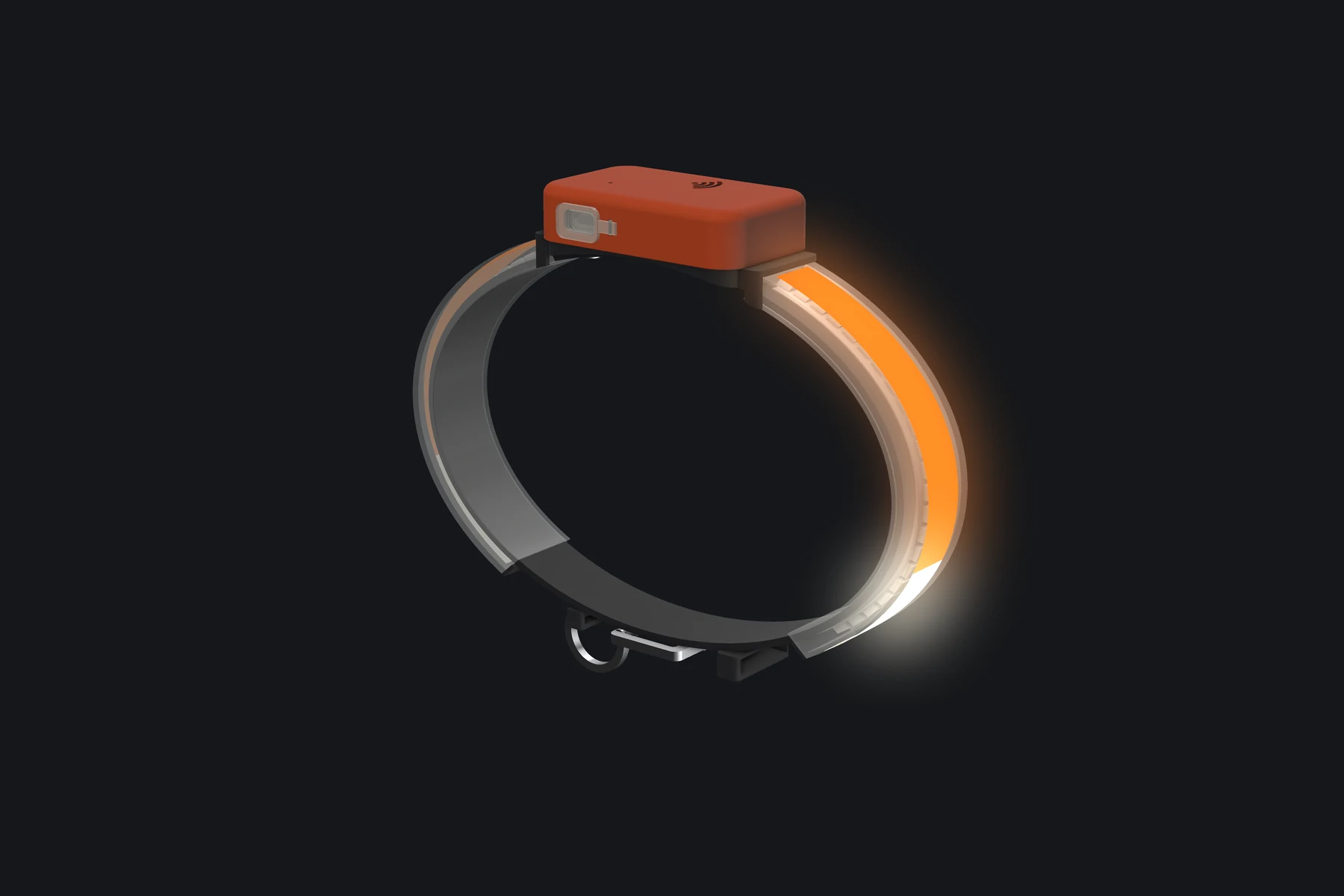
- Switch the lights on and off under Controls. Pick a color and one of three levels.
- The eight lights nearest the ground turn white and follow the ground as the collar turns. Turn the ground light off if you only want color.
- On at dusk switches the lights on by themselves during a walk after sunset.
- The lights go off by themselves at home and when the battery is low.
- An hour of light at the normal level uses about 21 percent of a charge.
8. In the car
Never leave a dog alone in a parked car. A parked car gains about 19 °F in 10 minutes, and cracking the windows makes no real difference. The car monitor is a backup for when the engine and the air conditioning are running and you step away.
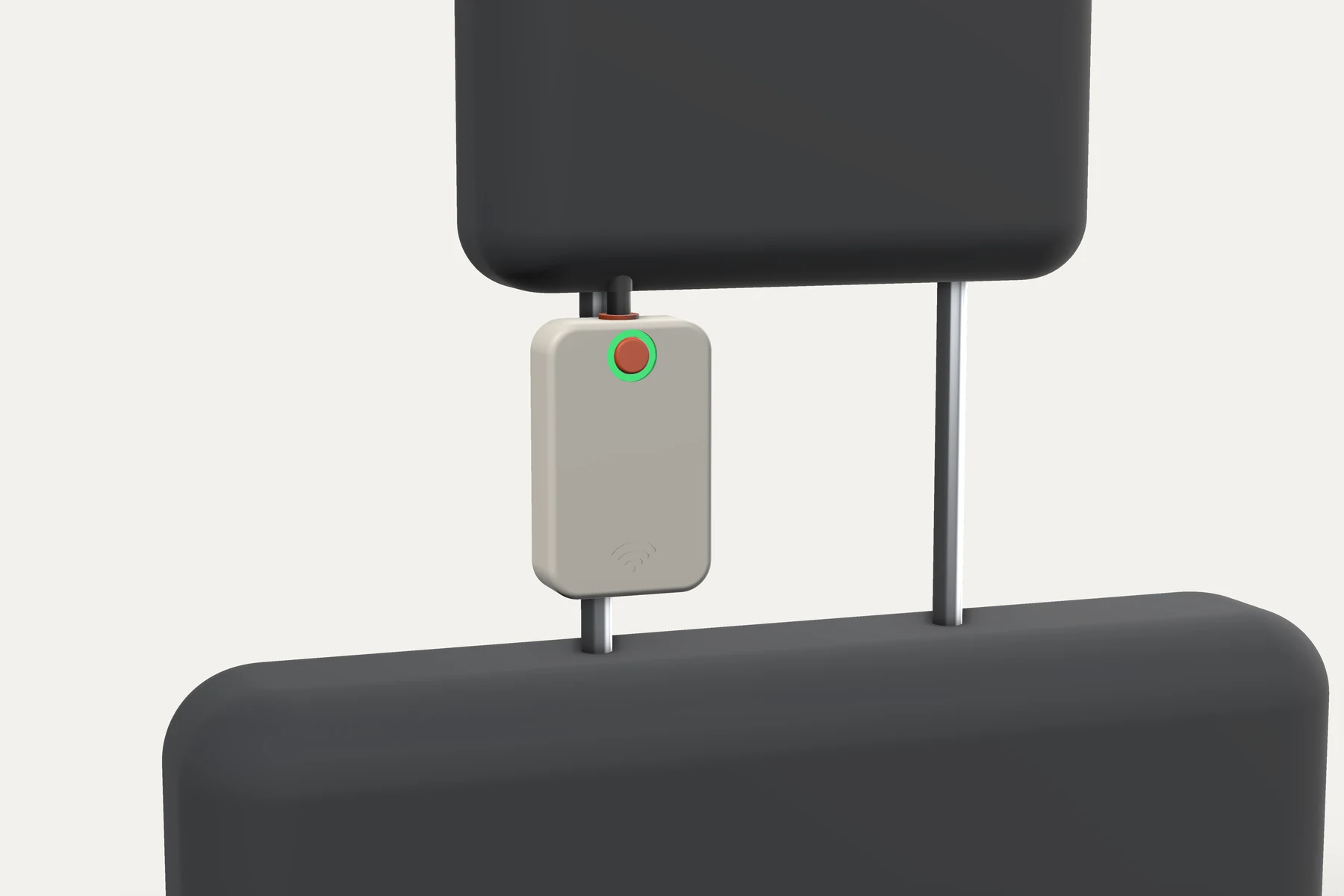
- Strap the monitor to a headrest post, high in the cabin, out of direct sun. Plug it into the car's USB socket.
- When you step away, press its orange button once. The ring turns green: it is watching. You can also arm it from the app.
- Press the button again when you are back.
Your phone gets an alarm when:
- the cabin passes your limit. It starts at 80 °F; change it in the app;
- the cabin climbs fast, about 3 °F in 5 minutes, even if it is still under your limit;
- the monitor goes quiet and your phone stops hearing from it.
The monitor also passes the collar's messages on, so a car parked on high ground stretches your reach. On its cells it lasts about 11 days doing that.
9. At home
- Plug the home base in and stand its antenna up.
- In the app, open Radios, add the home base, and give it your Wi-Fi name and password.
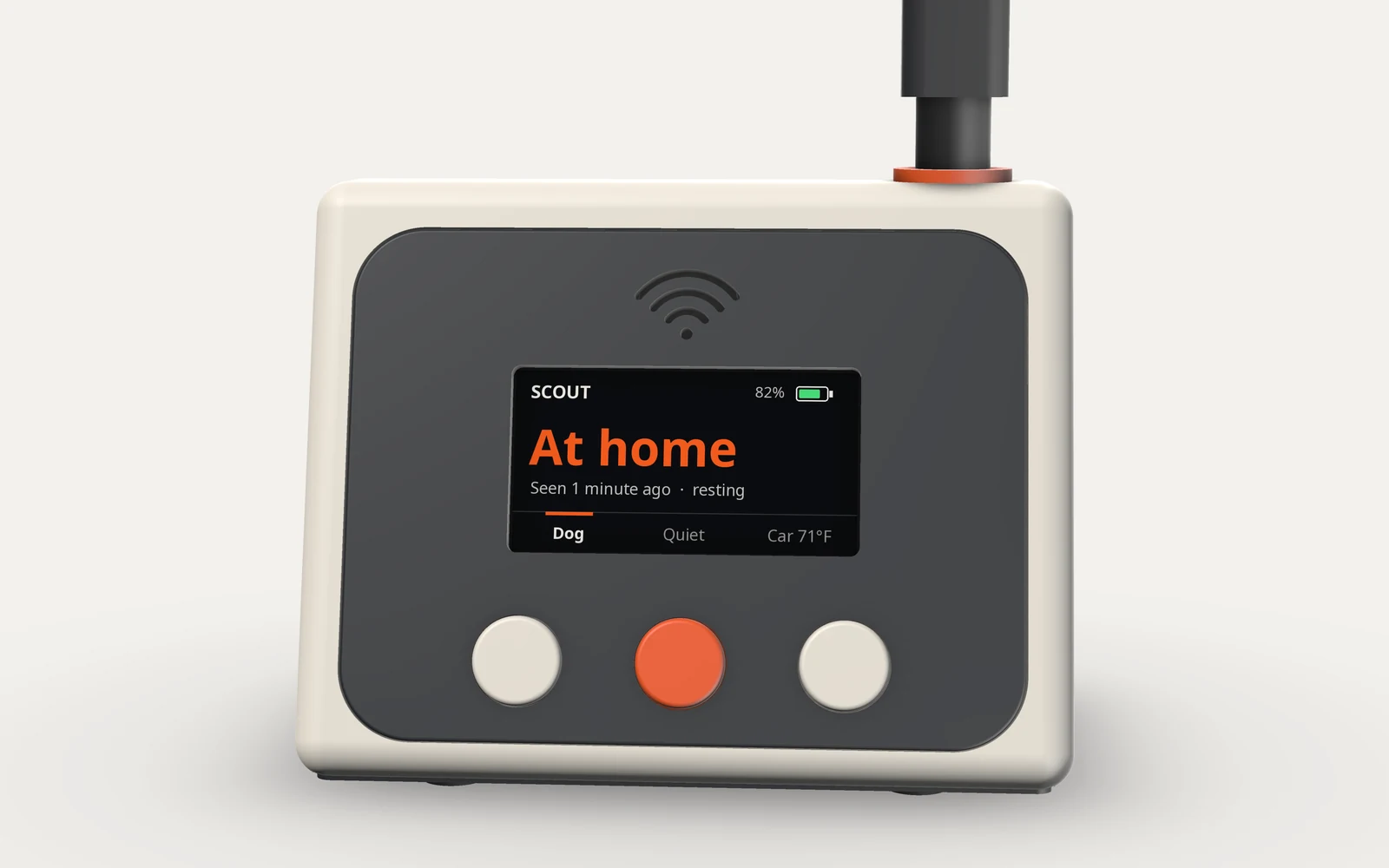
- The left and right buttons change the page. The orange button in the middle silences the buzzer, and on the Quiet page it turns alerts off for a while.
- Dog shows whether the dog is home, the collar's battery, and when it last reported.
- Car shows the cabin temperature when the car monitor is in range.
- When the collar hears the home base it knows it is home and switches its GPS off. That is what stretches the battery to about 13 days at home.
- The home base can read the collar's reports. It cannot send commands.
10. Battery life
Worked out from the parts' data sheets with cautious inputs. Not measured yet.
| What it is doing | Collar | Small collar |
|---|---|---|
| Tracking, a position every 2 seconds | about 18 hours | about 5 hours |
| Walks, a position every 30 seconds | about 3 days | about 19 hours |
| At home | about 13 days | about 4 days |
| At home, bark listening off | about 9 weeks | about 20 days |
What uses it up fastest: tracking, lights, and bark listening. What does not matter much: voice clips, vibration, and how often you look at the map.
11. Water and care
- The collar is designed for rain and swimming: a sealed lid, a plugged charging socket and a water-rated speaker. That has not been tested yet. Until it has, treat it as rain-proof and no more.
- Press the plug fully home every time. Check that it is not cracked.
- Rinse the collar in fresh water after salt water or mud. Let the charging socket dry before you charge.
- The orange bumper pulls off. Replace it when it is chewed, or change the color.
- The neck pad and the strap wash with soap and water.
12. If something is not working
| What you see | What to try |
|---|---|
| The first tap is slow | That is normal. The collar wakes once a second. Following taps are instant for 10 seconds. |
| The position is old | At home the GPS is off, so the map shows "at home" and the last known place. Press Find now for a fresh one. |
| No answer from the collar | Check that the phone radio is switched on and its light is blinking. Swing the antenna up. Move to open ground or higher ground. The app tries three times before it says the collar did not answer. |
| The collar will not pair | Unplug it from its charger, plug it in again, and start within two minutes with the phone beside it. |
| The collar does not charge | Look for the light behind the clear plug. Try another cable. Make sure the socket is dry. |
| Voice clips are quiet | The speaker is small so that it can be sealed. Record clips close to the phone, in a firm voice. |
| The lights will not come on | They stay off at home and when the battery is low. |
| The car monitor's ring is dark | Press its button to arm it. If it stays dark with the car off, replace the three AA lithium cells. |
| The home base shows "away" when the dog is home | Stand its antenna up and move it away from metal and thick walls. Check that the collar has charge. |
13. Safety
- Never leave a dog alone in a parked car.
- This collar has sound and vibration only. Use Stop everything if the dog is distressed.
- A tracker does not replace a leash, a fence or an ID tag.
- Check the fit often. A collar that is too tight hurts; one that is too loose catches.
- Radio reach depends on the ground between you and the dog. Do not count on a signal in a place where you have not tried it.